[MATT Wk 13] Malicious Documents Analysis
Malicious Documents
Malicious documents are a common vector for malware delivery.
- Can be in forms of Word, Excel, PDF, etc. that contain malicious macros or scripts
- Often used in targeted attacks (spear phishing)
Office Documents
Two ways of executing code in Office documents:
- VBA Macros
- Executes on document open or when user clicks
OKon a prompt
- Executes on document open or when user clicks
- Embedded Shellcode
- Executes when the object is loaded
- Does not require user interaction
Analysis
Tools like OfficeMalScanner can be used to extract macros from Office documents
OLE (Office 97-2003)
OfficeMalScanner <file> info- Checks if macros can be extracted (saves as.Macrosfile), and displays OLE structure and other metadata.strings2 -nh <file>.Macros- Extracts strings from the macros
OOXML (Office 2007+)
OfficeMalScanner <file> inflate- Decompresses MS Office documents and extractsvbaProject.bin(contains macros)cd C:\Users\MATT2020\AppData\Local\Temp\DecompressedMsOfficeDocument\word- Change directory to wherevbaProject.binis extractedOfficeMalScanner vbaProject.bin info- Extracts macros fromvbaProject.bincd VBAPROJECT.BIN-Macros- Change directory to where the extracted macros arestrings2 -nh doc- Extracts strings from the macros- [OPTIONAL] Use SSview to examine earlier versions of the VBA macro.
PDF Documents
PDFs can contain JavaScript/Shellcode that can be used to exploit vulnerabilities in the PDF reader.
Analysis
pdfid <file>- Checks for malicious indicators in the PDF- Malicious indicators:
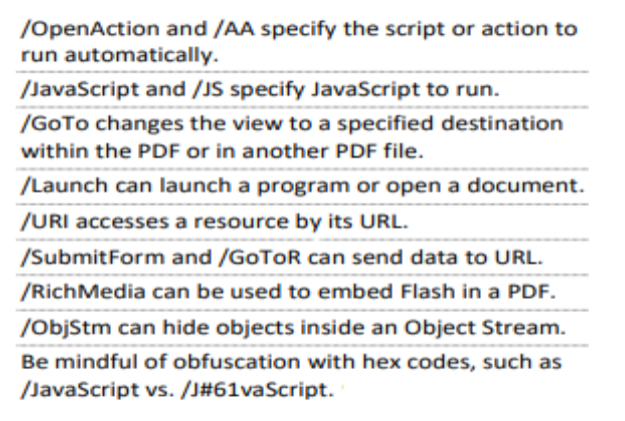
- Malicious indicators:
pdf-parser --search /JavaScript <file>- Locates JavaScript object- Output may look like (without my comments ofc):
1
2
3
4
5
6
7
8
obj 31 0                 # Indicates onject number within the PDF file, i.e. object 31, generation 0
  Type:                  # Type of object
  Referencing: 32 0 R    # Object 31 references another object

  <<                     # Denotes dictionary object in PDF
     /S /JavaScript      # Key-Value pair - /S action is to execute JavaScript
     /JS 32 0 R          # Key-Value pair - /JS points to object where JavaScript is stored
  >>
pdf-parser --object 32 --filter --raw <file>- Extracts JavaScript from object (32 here since it was referenced in the previous step)- Examine the JS file extracted and deobfuscate if necessary
This post is licensed under
CC BY 4.0
by the author.